 07/07/2026

 3 mins to read
 At ServiceOrca, we are constantly working on tools that help service providers build trust, improve their profiles, and connect with more customers.
We are excited to introduce a new feature: printable QR posters for customer reviews.
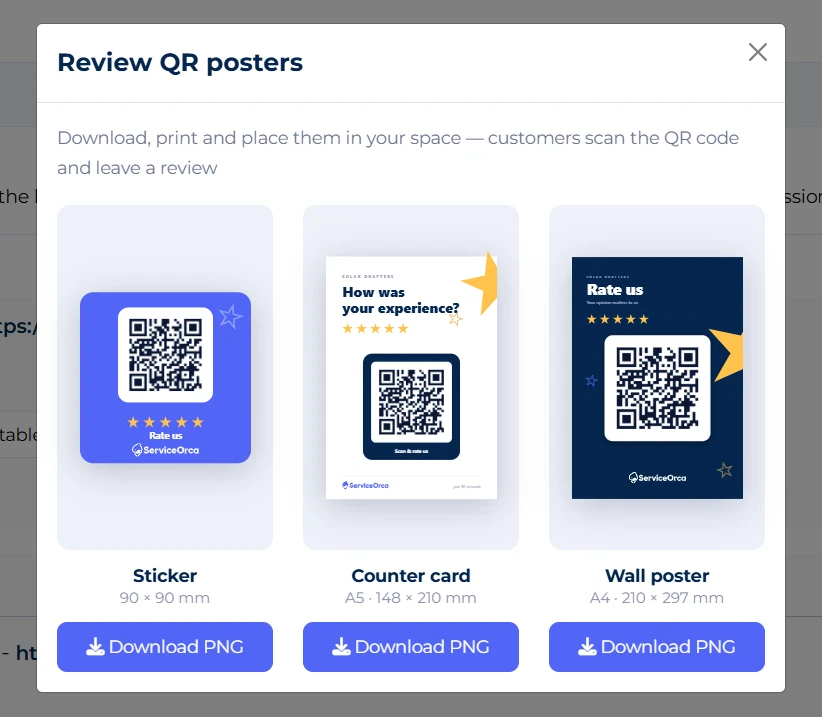
With this feature, service providers can now download professionally designed QR posters from their ServiceOrca dashboard, print them, and present them to customers after completing a service.
How It Works
Each business and service page on ServiceOrca has its own QR code. When a customer scans the code, they are taken directly to the provider’s ServiceOrca page, where they can leave a review and rating.
This makes the review process much easier.
Instead of asking customers to search for your page manually, you can simply show them the QR poster. They scan it, open your page, and leave their feedback.
Why Reviews Matter
Customer reviews are one of the most important trust signals on ServiceOrca.
When people are looking for a plumber, cleaner, lawyer, beauty specialist, repair technician, consultant, or any other service provider, they often want to see what previous customers have said before making a decision.
Real reviews help customers understand the quality of your work, your reliability, and the experience they can expect.
A profile with complete information, good photos, and genuine customer reviews is more likely to stand out.
Where You Can Use the QR Poster
The QR poster can be used in many places, depending on your type of service.
You can place it in your:
- Office
- Reception area
- Salon
- Workshop
- Clinic
- Service center
- Storefront
- Waiting area
- Service vehicle
If you provide services at the customer’s location, you can also keep the QR poster printed or saved on your phone and show it to the customer after the work is completed.
Available Poster Formats
ServiceOrca provides different QR poster designs and sizes, so you can choose the format that best fits your business.
You can download designs suitable for:
- Small display cards
- Table cards
- Wall posters
- Customer-facing printed materials
The designs are created to be clean, professional, and easy for customers to understand.
How to Download Your QR Poster
To download your printable QR poster:
- Log in to your ServiceOrca business account.
- Go to Settings.
- Open the Reviews section.
- Choose the QR poster design you prefer.
- Click Download PNG.
- Print it and start using it with your customers.
How to Ask Customers for Reviews
The best way to ask for a review is to keep it simple and natural.
For example, you can say:
“If you are happy with our service, we would really appreciate it if you could scan this QR code and leave us a review on ServiceOrca.”
It is important to ask for honest feedback. Real and genuine reviews are the most valuable for your business and for future customers.
Final Thoughts
The new printable QR poster feature was created to help ServiceOrca providers collect reviews more easily and strengthen their online presence.
If you already have a ServiceOrca business account, log in to your dashboard, download your QR poster, print it, and start collecting more customer reviews today.
ServiceOrca — find trusted service providers across different fields in one platform.